How To Use Punctuation Remover Tool
Our Punctuation Remover is free, online and simple to use with effective results. Whether you are a writer, programmer or data analyst, you can sanitize your text in seconds. It gives you precise control: you may maintain spaces, remove digits, and define which punctuation marks to keep. It is just a matter of following the easy instructions below to convert your text quickly. This automates the manual editing process, saving you time and guaranteeing uniformity throughout your documents.
- Input Your content
- Copy and paste your content into the main input field.
- Click the "Example" button to load a sample and see the tool in action.
- Upload a text file .txt directly with the file upload button on the toolbar.
- Choose Your Preferences
- Select "Preserve spaces" to keep words apart (recommended).
- Tick "Remove numbers" to erase all numeric digits from the output.
- In the "Keep these punctuation marks" box, enter any symbols (such as .?!) you want to save from stripping.
- Review and Process
- Click the "Remove Punctuation" button to tidy your text in an instant.
- The result will be cleaned and displayed in the output box for immediate evaluation.
- Click the "Clear All" button to clear both boxes and start over.
- Export Your Result
- Click "Copy Result" to copy the cleaned text onto your clipboard.
- Press the "Download" button to download the result as a .txt file to your device.
- You can now take your punctuationless text and use it in any application.
Examples of Removing Punctuation
It helps to see the tool in action to understand what it can do. Here are three such cases showing how the Punctuation Remover changes text for different applications. Examples: Each example has the input and output, showing the effect of settings such as maintaining spaces or certain markings on the final output. These examples include the creative writing, data processing and technological use cases.
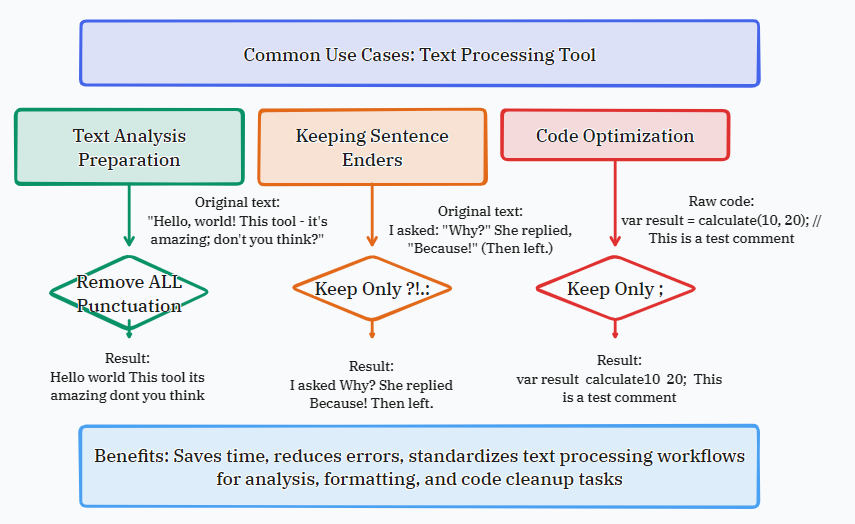
What is Punctuation and Why Strip It?
Punctuation is a set of symbols in written language that helps to clarify content, signal pauses and separate structural elements such as sentences and phrases. Common punctuation signs are periods (.), commas (,), question marks (?), exclamation marks (!), quote marks (" "), and dashes (—). Punctuation is useful for human readability, but it can interfere with computer processing, data analysis, and some text formatting activities. Punctuation removal is an important phase in text normalization in several areas.
- Natural Language Processing (NLP): Machine learning models are generally trained on tokenized text, where punctuation is eliminated to decrease vocabulary complexity and focus on essential terms.
- Data Mining & Analysis: Punctuations in social media, surveys or document data are cleaned to assure accuracy of keyword analysis and word count consistency.
- Development & Programming: When strings are processed, punctuation may be syntactically relevant. It has to be stripped for clean slugs, IDs or comparing user input.
- Accessibility & Readability: Some people with cognitive problems or learning a language find simplified writing that does not include punctuation easier to parse.
- Creative & Administrative Tasks: Word clouds, producing text for subtitles or teleprompters, or basic word lists often demand punctuation-free text.
How the Punctuation Remover Works
This program leverages a powerful client-side JavaScript algorithm to swiftly and safely parse your text online. There is no data sent to a server; it is completely private. The basic principle is to iterate through each character of your input string and apply a set of rules based on your selected options. It is a fast and efficient procedure and can deal with huge chunks of text without any performance difficulties.
- Character Analysis: The tool analyzes all the characters of the provided text.
- Unicode-Based Detection: It uses the whole Unicode character categories to identify punctuation, including punctuation from other languages and symbol sets.
- The "Preserve spaces" option looks for whitespace characters (space, tab, newline) and leaves them in the output.
- The "Remove numbers" option removes characters that are decimal digits (0-9).
- Exception Handling: Characters submitted into the “Keep these punctuation marks” form are added to an allowlist, and even if they are usually punctuation, they will not be removed.
Features of Our Tool
The difference with our Punctuation Remover is the ease of use combined with robust and customizable functionality. It is suitable for casual users as well as professionals with advanced needs. All of the features are oriented to provide you with the utmost control of the text cleaning process without sacrificing an intuitive interface that requires no technical knowledge to work.
- Instant, Browser-Based Processing: Runs fully in your web browser for ultimate speed and privacy. Your writing never leaves your computer.
- Fine-Tuned Control Options: Go beyond basic removal with toggles for spaces and numbers, and a custom exceptions field for fine-tuned control.
- Multiple Input/Output Methods: Pasted text, file upload (.txt), and one-click copy and download of results.
- Clean, Modern Interface: Distraction-free layout puts your text and the tools you need front and center, with clear visual feedback.
- Unlimited & Free: No registration, no usage limitations and no hidden charges. Process as much text as you like.
FAQs (Frequently Asked Questions)
Get quick answers to the most commonly asked questions about using the Punctuation Remover tool. This part provides technical information, clarifications of use cases and practical recommendations to help you get the best outcomes. If your query isn’t answered here, try utilizing the “Example” button in the tool to view a live demonstration of its capabilities.
- Is my text safe using this tool? Certainly. All processing is done locally in your browser (client-side JavaScript). Your text is never sent to any server; it is totally confidential.
- Does the tool get rid of any punctuation? It strips off an extensive list of characters, including periods, commas, semicolons, colons, exclamation points, question marks, quotation marks, apostrophes, brackets, braces, hyphens, dashes, ellipses and more, based on Unicode.
- Can I strip punctuation in a non-English language? Yep. The program employs Unicode character identification, thus punctuation will be removed in most languages such as Spanish (¿¡), Greek (;) and Arabic (؟).
- What is "Preserve spaces"? If checked, it preserves spaces, tabs and line breaks. If left unchecked, it strips them away along with punctuation, combining all words into one long string.
- How can I retain certain punctuation, like decimal points in numbers? Use the box. Keep these punctuation marks. To keep the decimal points, you might write "." into that area. If you check the "Remove numbers" box, it will remove the numbers and leave only the point.
- What’s the maximum size of text I can process? No limit. You can upload or paste very large text files. The utility is optimized for efficiency and the performance is dependent on your device’s RAM.
- Can I use the output for business purposes? Yes. The utility only changes the text you input. You have the original input and the product you have generated, and you can keep it for any personal or business purpose.
