
Mirror Text Generator

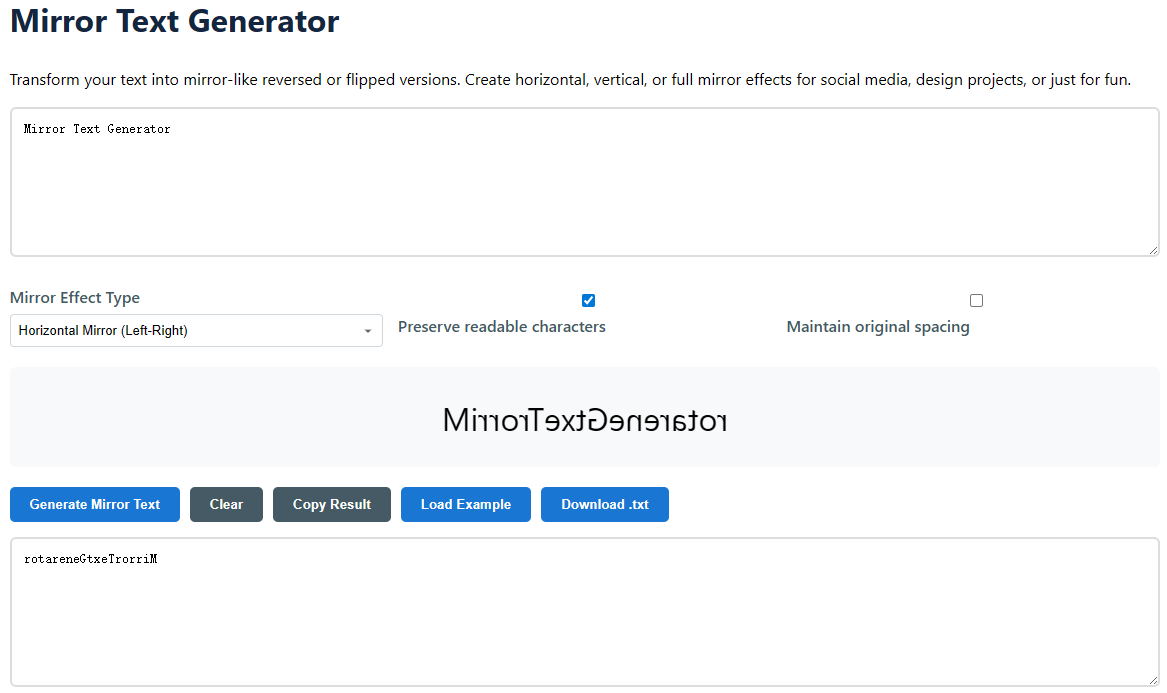
Transform your text into mirror-like reversed or flipped versions. Create horizontal, vertical, or full mirror effects for social media, design projects, or just for fun.

Your mirrored text will appear here

What is Mirror Text and How it Works?

Mirror text is a cool typography trick where text is turned into a mirror image of itself. This can be done by reversing the order of characters, reversing them vertically, or both, to generate a perfectly symmetrical mirror image. Mirror text is not just reversing text, but the visual orientation of individual glyphs is manipulated to preserve reading or produce a specific aesthetic illusion. This application automates a complicated mapping and orienting process for characters so anyone can create accurate mirror writing in seconds.

It is based on the idea of symmetry and reflection in mathematics and design. Mirror text copies this optical effect digitally. This is how you see the world when you look in a mirror - flipped over a center line. The generator applies powerful algorithms to your input, determines the attributes of each character and applies the transformation you chose: horizontal flip (left-right), vertical flip (top-bottom) or full inversion. The “Preserve readable characters” option is particularly ingenious, substituting normal letters with Unicode characters that are meant to resemble their mirrored versions, so the output is still intelligible when flipped.
Original: Hello World!
Horizontal Mirror: !dlroW olleH
  • Horizontal Mirror (Left-Right): Reverses the order of characters, making the text read backwards from right to left.
  • Vertical Mirror (Top-Bottom): The characters are upside down. It often uses peculiar Unicode characters that look like upside-down letters.
  • Full Mirror (Both Directions): Applies both horizontal and vertical flips, making the text reversed and inverted for a real mirror image effect.
  • Simple Reverse: Simple character-by-character reversal, the same as the horizontal mirror, but as a base function.

Mirror text

How to Use the Mirror Text Generator

  1. Input Your Text: Click into the main text box and type or paste in the text you want to transform. It could be a word, a sentence, a social media bio, or even a paragraph.
  2. Adjust Your Mirror Effect: Use the control panel to fine-tune the effect to your specific needs.
    • Pick Mirror Type: Choose between Horizontal, Vertical, Full or Simple Reverse depending on the visual effect you want.
    • Maintain Readable Characters: Check this if you want inverted letters to stay legible. For a literal flip that may employ less common symbols, uncheck this.
    • Preserve original spacing: Turn this on if you want to maintain the same spaces and tabs and line breaks in the mirrored output as in your original input.
    • Create & Preview:
      • Hit "Generate Mirror Text": View a real-time preview of your mirrored text in the preview window.
      • Check the Result: The final output will be filled in the lower text area. Check and see whether it does what you want it to do.
  3. Apply the Result: When you are happy, copy the text to your clipboard with one click using the toolbar buttons, download it as a .txt file for future use or clear the fields to start a new project.
  4. Try Examples: If you are not sure where to start, click the "Load Example" button. This will load the tool with example text so you can see each mirror effect in action before applying it to your own content. Advanced Tip: For intricate symmetrical designs, you can try making several variations (horizontal and vertical, for example) and overlaying them in your graphics program for design tasks.

This easy procedure is built for efficiency. If you’re a designer under a deadline or a social media user in need of a quick creative boost, you can go from idea to finished mirrored text in less than a minute. It takes care of all the technical intricacies for you, so you can focus on being creative.

Creative and Practical Applications of Mirrored Text

Mirror text is more than a curiosity; it is a powerful tool with applications in digital art, business, education, and personal expression. Its distinctive visual features can be used to convey mystery, highlight duality, or just grab attention in a cluttered digital arena. The following are some important areas where mirrored text is most useful.

Graphic Design & Digital Art

  • Logo Creation: Create logos including mirrored components that imply balance, reflection, or partnership. This approach is a common choice for brands dealing with optics, electronics or wellness.
  • Design of Album Art & Poster: Design eye-catching abstract images for music records, movie posters, event fliers. Mirror text may create detailed patterns and symmetrical designs.
  • Typography Art: Use vertically or totally mirrored text as a key artistic element in digital paintings or print compositions to play with perception and readability.
  • Watermarks & Branding: Create subtle mirrored text watermarks for photographs or digital assets, giving a level of professional branding that is tougher to erase.

Social Media & Personal Branding

  • Instagram & TikTok Bios: Make your profile pop by utilising vertically mirrored text in your bio. It is an eye-catcher immediately, and it screams ingenuity.
  • Story & Reel Text Overlays: Add mirrored captions or keywords to your short-form video content for a dynamic, eye-catching effect that improves the visual story.
  • Twitter/X Handles & Display Names: Change a letter or word in your social media handle to make a unique and memorable username.
  • Facebook Frame Design: Design personalised profile photo frames or badges with mirrored slogans or campaign phrases.

Educational & Cognitive Activities

  • Brain Training: Use horizontally mirrored (reversed) text in puzzles and games to develop pattern recognition and cognitive adaptability.
  • Language Acquisition: Help pupils grasp the structure of words through deconstruction and reversal, particularly beneficial for languages with alternative reading directions.
  • Art Classes: Teach children about symmetry, reflection and composition concepts by asking students to create projects that include reflected text.

Technical & Niche Applications

  • Encoding & Obfuscation: Hide messages or codes somewhat in games, puzzles, or escape rooms with mirrored text, which can be "decrypted".
  • Software & Game Development: Build immersive worlds and mythology by creating in-game artefacts, mystical scrolls, or alien languages that use mirrored text.
  • Product Packaging: Create packaging that displays text only when viewed in a mirror, enhancing the “unboxing” experience for buyers.
  • Thematic Presentations: Use mirrored text on PowerPoint or Google Slides title cards for presentations about reflection, change or future technology.

Frequently Asked Questions (FAQ)

Is the mirrored text created by this program copy-paste friendly?

Yes, absolutely. You may copy it from the result box and paste it to most social media platforms, text editors, design applications such as Photoshop or Canva, and messaging apps. Very old or restrictive systems may not support the unusual flipped letters needed for vertical mirroring, but horizontal and reversed text will work everywhere.

What does “Preserve readable characters” mean?

This clever function makes the mirrored output as legible as possible. When activated (default), the program maps regular Latin letters to specialised Unicode characters designed to be visually mirrored or inverted versions of them. For example, 'a' is turned into 'ɐ' and 'b' into 'q'. Disabling this will have the tool execute a more literal, code-level transform, which may produce less common or even empty placeholder characters, lowering readability but giving a different appearance.

Can I mirror text in other languages besides English?

Yes, the program is capable of working with text in many languages that employ the Latin, Greek, or Cyrillic alphabets. The mapping to “readable character” is most accurate for the regular Latin alphabet. For complex scripts (Arabic, Hindi, Chinese, etc.), the horizontal flip will function on the character sequence, but the vertical flip may not yield legible glyphs, because there are no matching mirrored characters in Unicode for those scripts.

Is there a limit to the amount of text I can reflect at one time?

For best performance and a smooth experience, we recommend mirroring text blocks of a few paragraphs at a time. Very long texts (tens of thousands of characters) may hinder processing in your browser. The program is intended for creative snippets, social media content and design aspects, not for translating full-length novels.

What is a “Full Mirror” and how is it different than just executing both steps separately?

A Full Mirror “inverts” the text with a real 180-degree rotation, which is technically and visually different from flipping each character vertically and then reversing the text as two separate stages. Our technique performs this combination transformation in one pass, guaranteeing a correct and consistent mirrored image. Doing it manually in 2 distinct processes could have undesirable consequences depending on the character set used.

Do you keep or save my text on your servers?

No. Privacy is at the heart of our tool. All word processing is done in your web browser using JavaScript. We never send your input text to our servers or store it in any way. When you close the page or clear the text field, the data is gone. You can confidently use the tool on any text, including sensitive information.

Want other text transformations? Try Random Case Generator →