
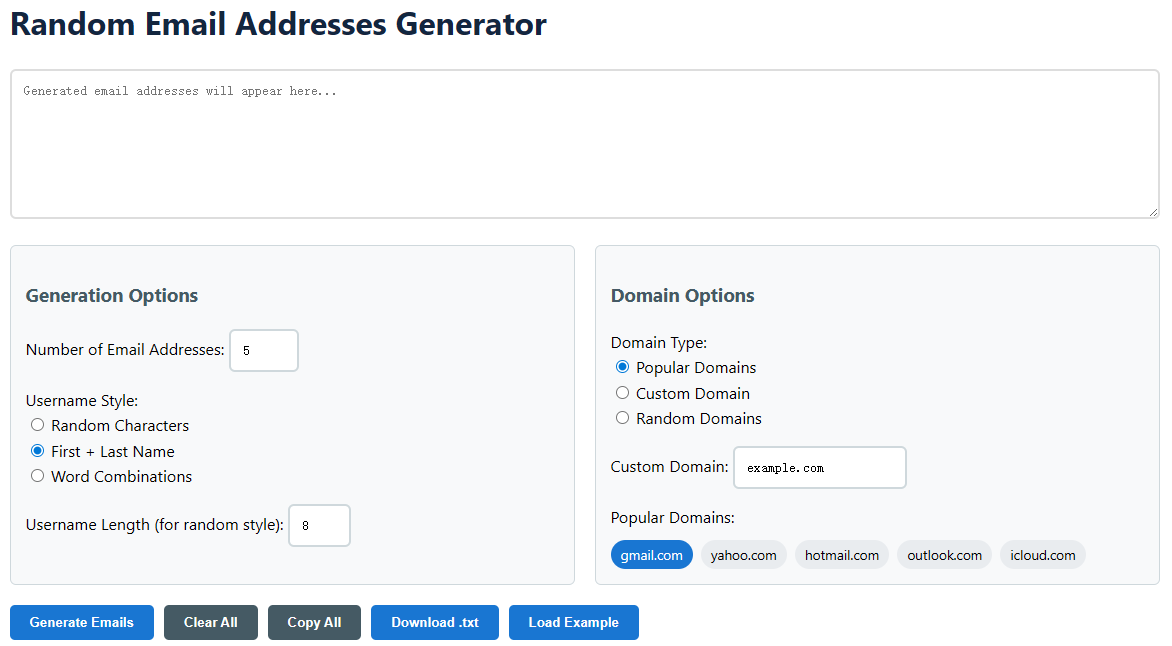
Random Email Addresses Generator

Generation Options

Domain Options

gmail.com yahoo.com hotmail.com outlook.com icloud.com

How to Use the Random Email Address Generator

  1. Configure Your Generation Settings
    • First, specify the Number of Email Addresses you need, from 1 to 100.
    • Next, choose a Username Style: 'Random Characters' for alphanumeric strings, 'First + Last Name' for realistic personas, or 'Word Combinations' for memorable addresses.
    • If you selected 'Random Characters', you can also adjust the Username Length to be between 3 and 20 characters.
  2. Select Your Domain Preferences
    • Choose a Domain Type. 'Popular Domains' uses well-known providers like Gmail or Outlook. 'Custom Domain' lets you input any domain (e.g., yourcompany.test). 'Random Domains' generates less common domains for maximum anonymity.
    • If you selected 'Popular Domains', simply click on any of the preset tags (like gmail.com) to activate or deactivate it. The generator will only use your selected domains.
  3. Generate and Manage Your Results
    • Click the Generate Emails button. Your list of unique, valid email addresses will instantly appear in the output box and the list below.
    • Use the Copy All button to copy every address to your clipboard with a single click, ready to paste into any spreadsheet or form.
    • For permanent records, use the Download .txt button to get a plain text file. The Clear All button resets the tool for a new session.

Common Use Cases for Random Email Addresses

  • Software Testing & Development: QA teams and developers use bulk-generated emails to test user registration flows, email notification systems, and database integrity without risking spam to real accounts or violating data privacy laws.
  • Protecting Personal Privacy: Use a unique, disposable email address when signing up for newsletters, online forums, or e-commerce sites. This shields your primary inbox from spam, phishing attempts, and data breaches while keeping your real identity separate.
  • Marketing & Sales Demos: Marketing professionals can populate CRM systems or demo landing pages with realistic-looking lead data. This allows for realistic presentations of email campaign dashboards, segmentation, and automation workflows without using real customer information.
  • Academic Research & Surveys: Researchers conducting studies that require anonymous participant identifiers can use generated emails to create unique, unlinkable IDs for subjects, ensuring anonymity while maintaining a method for longitudinal tracking if needed.
  • Creating Sample Data for Training: Instructors and trainers can quickly create datasets for courses in data analysis, digital marketing, or software applications. These realistic but fake emails provide safe, ethical material for hands-on learning exercises.
  • Avoiding Account Limitations: Some online platforms limit features based on the number of accounts per user. While respecting Terms of Service, generated emails can be useful for legitimate scenarios like creating separate accounts for different business functions (e.g., support, billing, social media).
  • SEO & Webmaster Tools: Webmasters can use unique emails to set up and verify multiple search console properties, analytics accounts, or webmaster tool profiles for different sites or subdomains, keeping administrative access neatly organized.

Understanding How the Generator Works

This tool is more than a simple string randomizer; it's engineered to produce syntactically valid and contextually appropriate email addresses. The process begins by constructing the local-part (the username before the '@'). Depending on your selected style, the algorithm follows different rules. For 'Random Characters', it creates a string from a pool of lowercase letters, numbers, and safe punctuation, ensuring it doesn't start or end with a dot. The 'First + Last Name' style pulls from extensive dictionaries of common names, combining them with optional separators like dots or underscores. The 'Word Combinations' style uses a different dictionary of nouns, adjectives, and verbs to create memorable and often humorous addresses.

The domain generation is equally sophisticated. For popular domains, it selects from your activated list. The 'Random Domains' option uses a large list of lesser-known but real domain extensions and pairs them with plausible second-level domain names. Crucially, the tool validates the final output against standard email format rules (RFC 5322), checking for invalid character sequences, length constraints, and the proper structure of the domain part. This ensures every address it generates could theoretically exist and pass basic format validation on any web form, making them perfect for testing and placeholder use.

Frequently Asked Questions (FAQ)

  • Are these email addresses real? Can I receive mail with them? No. The addresses are syntactically valid but not actively registered with any email provider. They are designed for placeholder, testing, and privacy purposes. You cannot send or receive actual emails with them.
  • Is it legal and ethical to use generated email addresses? Using generated emails for software testing, data anonymization, and personal privacy protection is perfectly legal and ethical. However, you must never use them for fraud, impersonation, harassment, or to violate any website's Terms of Service (e.g., creating fake accounts for deceptive purposes). Always use this tool responsibly.
  • Can I use these addresses to sign up for websites? While technically possible on some sites with lax verification, it is not the intended purpose and is often against the terms of service of the website. The primary uses are testing, data protection, and creating sample datasets.
  • How does the generator ensure uniqueness? The algorithm combines high-entropy random number generation with checks against its own output list for the current session. When generating multiple addresses, it will re-roll any duplicate local-part and domain combinations to provide you with a completely unique set.
  • What's the difference between 'Popular' and 'Random' domains? 'Popular Domains' (like gmail.com) are useful for creating realistic-looking user data. 'Random Domains' (like "mailer.xyz" or "contact.today") are better for maximum anonymity and stress-testing systems to ensure they accept a wide variety of email formats.
  • Can I save my configuration for later? The current version of the tool operates within your browser session. Your settings will persist as you use the page, but for long-term reuse, you can bookmark the page with your preferred settings manually configured. Future updates may include profile saving features.
  • Why is there a limit of 100 emails per generation? This limit ensures optimal browser performance and a smooth user experience. Generating extremely large lists can slow down page rendering and copying functions. For bulk needs, you can simply generate 100, download them, clear the list, and generate another batch.