
Random Lines Generator

Create custom random lines of text for testing, data generation, or creative projects. Adjust parameters below and generate instantly.

What is Random Lines Generator?

Random Lines Generator is a handy digital program designed to generate lines of text or numbers based on user-defined parameters. It’s a strong solution for professionals and creators who need placeholder content, test data, or creative prompts without the time-consuming effort of manual generation. This program facilitates the synthesis of random sequences, accelerating workflows in software development, content creation, academic research, and design.

Flexibility and control are the heart of the value of this instrument. Unlike basic random text generators, it lets you choose the exact number of lines, the sort of material you want (words, sentences, numbers, classic Lorem Ipsum, etc.) and the average line length. This sort of personalization means that the output you get is exactly what you need, whether you are populating a database, evaluating how a user interface will lay out or brainstorming ideas for a writing project. This makes a simple task quick and easy with just one click.
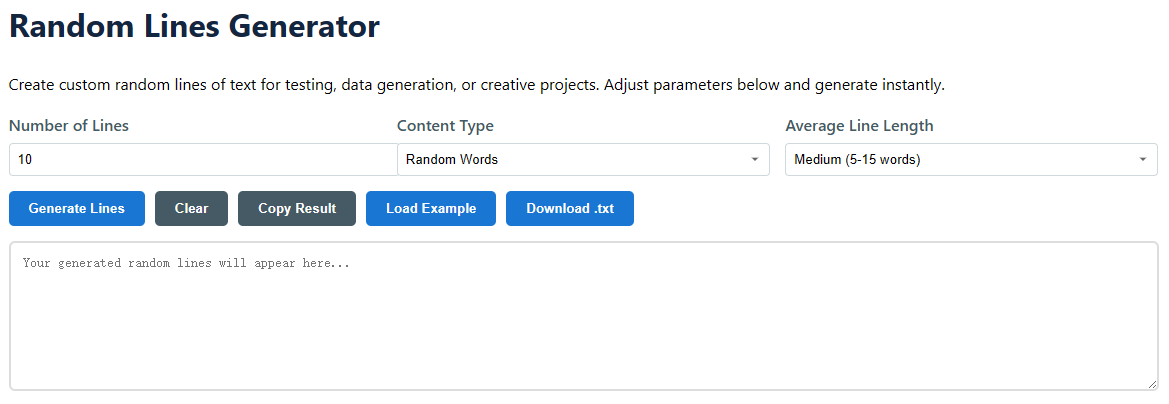
  • Automatic Data Generation: Save hours of manual entry by generating bulk text or numerical data in seconds.
  • Customized Output: Determine style, length and format for precise project requirements.
  • Wide Utility: Useful for UI/UX testing, software debugging, academic activities and creative writing.
  • Non-Contextual Text: Supplies a neutral, placeholder content that does not interfere with layout or functional testing.
random lines

How to Use the Random Lines Generator: Step-by-Step Guide

  1. Select Number of Outputs: In the field "Number of Lines," insert a precise number of lines you require. You can create from 1 to 1000 lines of content at a time; you may create little datasets and large datasets.
  2. Choose a content type and format: This is where you make the content and the shape of your lines.
    • Random Words - Generates lines made from of unconnected dictionary words. Excellent for testing tag clouds, keyword displays or graphic layouts.
    • Random Sentences: Generates syntactically correct but semantically meaningless phrases. Perfect for mocking up blocks of paragraphs in UI mockups.
    • Random Numbers: Generates lines of numeric data, which can be used to test forms, spreadsheets, or math programs.
    • Mixed Content: Uses a combination of words, numbers, and symbols to make complicated and realistic appearing test strings.
    • Lorem Ipsum: Creates the traditional Latin placeholder text, the de facto norm for the design and publishing sectors.
  3. Change Line Length: Use the “Average Line Length” drop-down to control the density of each line. Select from Short (short phrases) to Very Long (dense paragraphs) to evaluate your design or system with varied content loads.
  4. Generate & Manage Your Data: Click the "Generate Lines" button to generate your content. Results will immediately show in the output box. Then use the action buttons to copy the text to your clipboard, download it as a .txt file for offline usage, clear the box or load a pre-made sample to see the tool in action.
  5. Iterate and Refine: If the output is not exactly correct, you can easily change any of the parameters - from "words" to "sentences," for example or increase the number of lines - and produce again. It is instantaneous, and you may experiment quickly.

This easy, parameter-driven procedure means you obtain exactly the kind of dummy data you need in seconds, replacing manual, repetitive typing with fast, automated production.

Use Cases and Practical Applications

Randomly generated text is good for so much more than just placeholder text. It is an indispensable instrument for quality assurance, development, teaching and creative activities. It provides scalable, adjustable and meaningful data, so that the pros may focus on structure, functionality and design without the bias or difficulty of developing actual material.

Software Development & Testing

  • Database Population: Populate SQL or NoSQL databases with thousands of rows of realistic-looking user data, product names, or comments to test the query performance and application scalability.
  • User Interface (UI) Testing: Test the responsiveness and layout of websites and applications. Learn how text fields, tables and cards behave with short, medium, long and overflowing material.
  • Form Validation: Fill out online forms with vast amounts of random words and numbers to test validation scripts, character limitations and error handling routines.
  • Load and Stress Testing: Generate huge .txt files or data streams to simulate high traffic situations and test how systems manage large inputs.

Design & Prototyping

  • Website & App Mockups: Fill in Figma, Adobe XD or Sketch prototypes with realistic text blocks using “Lorem Ipsum” or “Random Sentences” to give customers and stakeholders a real feel for the finished layout.
  • Typography & Readability Studies: Evaluate fonts, spacing (kerning and leading), and color contrast with neutral information that doesn't alter perception through meaning.
  • Print Layouts: In brochures, periodicals or books, filler text is used to finalize page geometry, column widths, and image placement before the final copy is available.

Education & Research

  • Programming Exercises: Develop example data sets for students studying data parsing, string manipulation, or natural language processing methods.
  • Language Research: Create corpora of random words or sentence constructions for psycholinguistic studies or computational analysis.
  • Workshop Activities: Use random phrases as creative suggestions for brainstorming sessions, icebreaker games or writing workshops to generate unexpected ideas.

Content Generation & Maintenance

  • SEO & Plugin Testing: Load a staging website with generated content to correctly test the function of SEO plugins, meta tags, and content management system capabilities.
  • Social Media Scheduling: Make placeholder articles of various lengths to visualize and plan content calendars across channels.
  • Masking data: Generate anonymous copies of sensitive papers by substituting genuine names and details with randomly generated identities and details for safe sharing or training purposes.

FAQ

Is the content created by this tool copyrighted?

No. Randomly generated strings of words, numbers, or traditional Lorem Ipsum text are not creative works and do not have copyright. You can use the result for any purpose, including commercial projects, testing and publication, without attribution.

Can I use this to generate passwords or secure data?

Definitely not. This tool is not intended for cryptographically secure random values, but for placeholder and test data. The algorithms are not suitable to generate passwords, encryption keys or any security-sensitive information. Always utilize a special audited password generator for such uses.

What is the difference between "Random Sentences" and "Lorem Ipsum"?

Random phrases are phrases made up of random words that are grammatically correct in English. They can be useful to test readability in an English-language environment. It is a long-established fact that a reader will be distracted by the readable content of a page while looking at its layout. The point of using Lorem Ipsum is that it has a more-or-less normal distribution of letters, as opposed to using 'Content here, content here', making it look like readable English.

Is there a limit on the amount of data I can generate?

The utility may output up to 1000 lines at a time. For more data, you may just create additional batches and combine them using the copy or download features. This limit guarantees that the tool stays fast and responsive for all users, without exhausting the browser’s resources.

Why would I want random numbers as lines of text?

Random number lines are very useful for testing software that processes numerical input, such as financial apps, calculators, data analysis tools or scientific simulators. They assist in checking that the application appropriately handles a diverse number of formats, decimal points, big datasets, and can discover errors in parsing or calculation logic.

Need other types of random content? Try Random Case Generator →