How To Use The Vowel Remover Tool
Online Vowel Remover is a very simple and powerful tool. If you are a linguist, puzzle developer or writer, you can alter any text in seconds. It’s easy: paste your text, set your removal preferences, and press a button. The tool delivers instant results, thorough data and several choices to export your processed text. Follow these steps to get started and discover the full capabilities of this multifunctional utility:
- Input Your Text
- Configure Removal Options
- Select which vowels to delete (All, Lowercase, Uppercase, or custom).
- Check the boxes to Keep Y, Keep original case or Remove gaps
- Refer to the pre-set vowel sets for popular combinations.
- Process the Text
- Review Results & Stats
- Export Your Output
Real-Life Examples & Uses
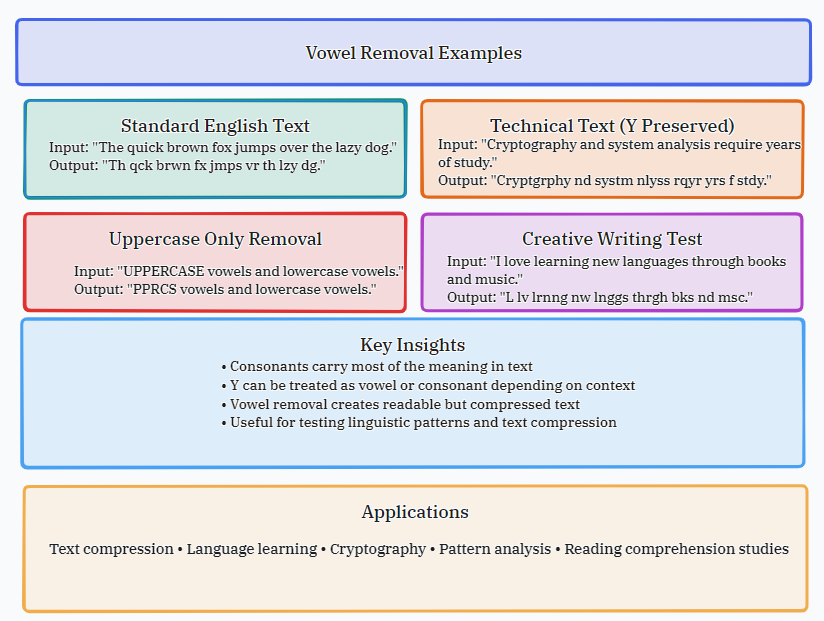
Removing vowels from text may seem like a simple trick, but there are many uses and applications of this process, from education to cryptography. Without even adding any new letters, you can make language puzzles, check readability, develop unique codes, and study the basic structure of language. This tool is flexible and can be used for artistic and analytical purposes. Some solid instances of how this tool can be used in real-life situations.
Linguistic Analysis & Phonics
Original:
The swift brown fox jumps over the slow dog.
All Vowels Removed: Th qck brwn fx jmps vr th lzy dg.
Make Word Puzzles & Games
Original: Cryptography and puzzle design.
Vowels Removed (Uppercase): CRYPTGRPHY ND PZZL DSGN.
Creating Short Codes or Abbreviations
Original: IBM
Vowels & Spaces Removed (Uppercase): NTRNTNLBSSNSMCHNS
Creative Writing & Constrained Writing
Original: A peaceful evening at the infinite sea.
Vowels Removed (A/E Only): srn vning by th ndlss ocn.
How the Tool Works: Logic and Features
There is a powerful text-processing engine behind the basic interface. It does an exact character-by-character examination of your input and identifies and removes characters according to your criteria. This is more than a simple search and replace, giving you fine-grained control over case sensitivity, handling of the letter 'Y,' and whitespace. In this part, we analyze the main technological elements of our powerful and accurate vowel remover.
- Custom Vowel Set: Specify exactly what letters to remove. Default is "aeiouAEIOU"; you can enter any sequence of characters.
- The 'Y' Conundrum: The letter ‘Y’ can serve as a vowel and a consonant. The option “Treat Y as consonant” allows you to decide how Y is treated.
- Case retention: When this feature is active, it will ensure that the consonants keep their original capitalization when you erase the vowels around them.
- Space Elimination: This secondary filter can remove any space characters and is beneficial for constructing continuous strings or codes.
Who Needs This Tool?
A vowel remover is unexpectedly useful. It’s a specialist tool for professionals, educators and hobbyists working with data, language or creativity. It provides you with a rapid way to disassemble text. This enables all kinds of analysis, problem-solving, and artistic expression that would be a chore to do by hand. See if you or your project can use this unique style of text manipulation.
- Linguists and Language Teachers: Use for phonology, syllable structure, and pronunciation drills.
- Puzzle and Game Creators: For anagrams, word searches, cryptograms and other language-oriented challenges.
- Writers and Poets: Try your hand at lipograms (writing that leaves out some letters) or other limited writing styles.
- Programmers and Data Analysts: To obfuscate data, create unique identifiers, or pre-process text for certain algorithms.
- Students and Researchers: Testing readability formulas, analyzing patterns in text or researching linguistic features of different languages.
Common Questions (FAQ)
You might have some queries about how the tool works or what it could be used for. Here are the answers to the most common questions we get asked. They are short and simple and will help you get the most out of the tool. All you need to know from character handling technicalities to creative uses, right here.
- Is the tool available in any language other than English? Yup. Of course. You can enter any Unicode text. The removal is based on the letters you enter in the field "Vowels to remove", therefore you can define vowels for any language (e.g., "aeiouäöü" for German).
- What about punctuation and numbers? Always keep punctuation marks, numerals and symbols. The program removes only characters that exactly match the list of vowels you choose.
- Can I delete consonants instead? No, not directly through the preset features of this tool. But you can also manually enter all the consonants into the "Vowels to remove" column for this reverse effect.
- How long can the text I process be? The application can handle very huge documents (tens of thousands of characters) right in your browser. Performance may vary slightly with really large documents.
- What’s the difference between “Preserve original casing” and merely eliminating lower-case vowels? It just removes lowercase vowels ("aeiou"); uppercase vowels remain. "Preserve original casing" works after vowel elimination so that the remaining letters retain their original case, which changes the visual formatting of the result.
- Is your text saved or sent to a server? No. All processing is done locally in your web browser. Your text remains on your computer, so it’s private and secure.
Best Results Tips
Here are some pro tips and best practices to make the most out of the Vowel Remover Online tool. Knowing how the different options work together allows you to get more accurate and desired results, either for analysis, creativity or utility. These tips will increase your efficiency and expand the range of what you can do.
- Strategically Combine Options: Use “Preserve Case” with a custom vowel set for precise control, especially with proper nouns or acronyms.
- Utilize the Example Button: Not sure where to begin? Click “Load Example” and watch the tool work with pre-configured text and parameters.
- Use File Upload: For long papers, please utilize the file upload feature instead of pasting, to save time and prevent slowing down your browser.
- Experiment with 'Y': Try the same text with the " Treat Y as consonant " option checked and unchecked. You will get different results for terms like " mythology " or " sky ".
- Check the Data: The stats bar gives instant feedback on the magnitude of changes, which is useful for quantitative linguistic study.
