
Random Case Generator

What is a Random Case Generator?

How to Use the Random Case Generator: A Complete Guide

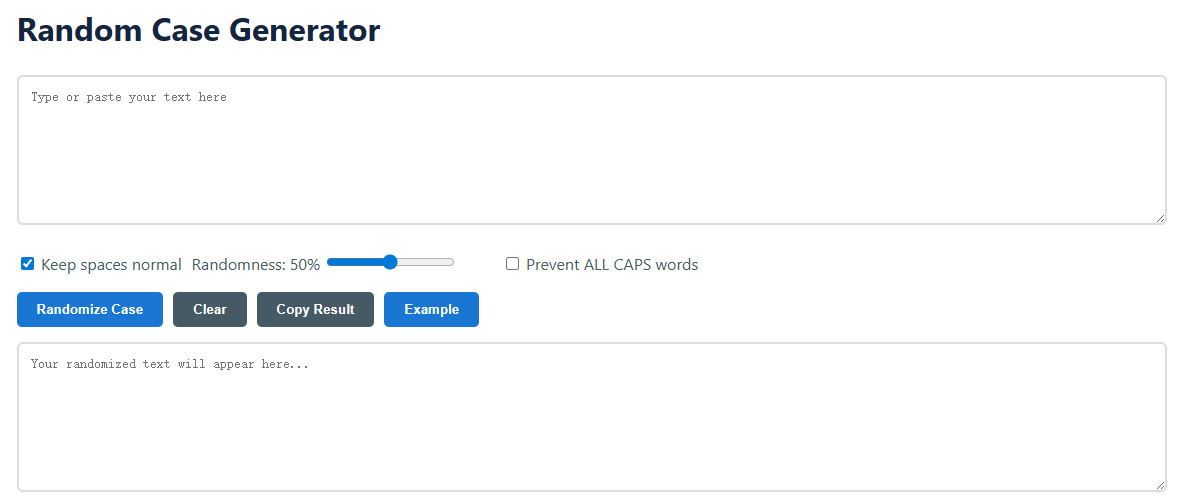
  1. Input Your Text: Click into the "Type or paste your text here" textarea. You can input anything from a single sentence to multiple paragraphs. The tool handles all standard characters, letters, and numbers with ease.
  2. Configure Your Settings: Fine-tune the output using the options below the input box.
    • Keep spaces normal: Leave this checked (default) to ensure spaces and punctuation remain unaffected, maintaining readability. Unchecking it can lead to unpredictable spacing.
    • Randomness Slider: This is the core control. At 1%, most letters stay as typed. At 100%, nearly every letter's case is flipped. Set to 50% for a balanced, noticeably random effect. The percentage updates in real-time as you move the slider.
    • Prevent ALL CAPS words: Enable this crucial option if you want to avoid entire words appearing in uppercase (e.g., "HELLO"), which can be perceived as shouting. The algorithm will ensure at least one letter per word is lowercase.
  3. Generate and Review: Click the blue "Randomize Case" button. Your transformed text will instantly appear in the lower "Result" box. You can click "Randomize Case" multiple times on the same input to get different variations, thanks to the live random algorithm.
  4. Finalize and Export: Use the "Copy Result" button to instantly copy the randomized text to your clipboard for pasting anywhere. The "Clear" button resets both boxes, and "Example" loads a sample text to demonstrate the tool's functionality.

Frequently Asked Questions (FAQ)

Is the text transformation truly random?

Yes, the transformation is pseudo-random, meaning it uses a mathematical algorithm to produce an unpredictable sequence of case changes. Each time you press "Randomize Case," even with the same text and settings, the output will be different. The "randomness level" slider controls the probability that any given letter will have its case changed, giving you direct influence over the intensity of the effect.

What are the main use cases for this tool?

The applications are diverse. Social Media & Branding: Create eye-catching bios, hashtags (#LiKeThIs), or post text that stands out in a feed. Creative Writing & Art: Convey a character's disjointed thoughts, create unique titles, or generate visual poetry. Coding & Development: Generate test data for strings to ensure applications handle mixed case correctly. Online Gaming: Craft unique, memorable usernames that aren't already taken in standard case.

Does the tool store or save my input text?

No. Our Random Case Generator operates entirely client-side. This means all processing happens directly in your web browser. Your text is never sent to our servers, logged, or stored. It remains private on your device, and refreshing or leaving the page will clear all data. We prioritize user privacy and data security.

Can I use this for languages other than English?

Absolutely. The tool works with any language that uses the Latin alphabet (e.g., Spanish, French, German). It processes individual character codes. However, for languages with complex scripts or ligatures (like Arabic or Devanagari), the results may be unpredictable or not function as intended, as these often require specialized Unicode handling beyond simple case toggling.