使用八進位轉十六進位轉換器
使用這個網路程式,可以快速、準確且免費地將數字從八進位(base-8)數字系統轉換為十六進位(base-16)。它針對程式設計師、學生和數位電子工程師,並自動化了一個如果手動操作會繁瑣且容易出錯的過程。輸入您的八進位數字,轉換器將立即給出正確的十六進位等值,並提供多種格式選項以符合您的需求。這是一個使用者友好的界面,可從任何具有網頁瀏覽器的裝置存取,無需安裝或註冊。
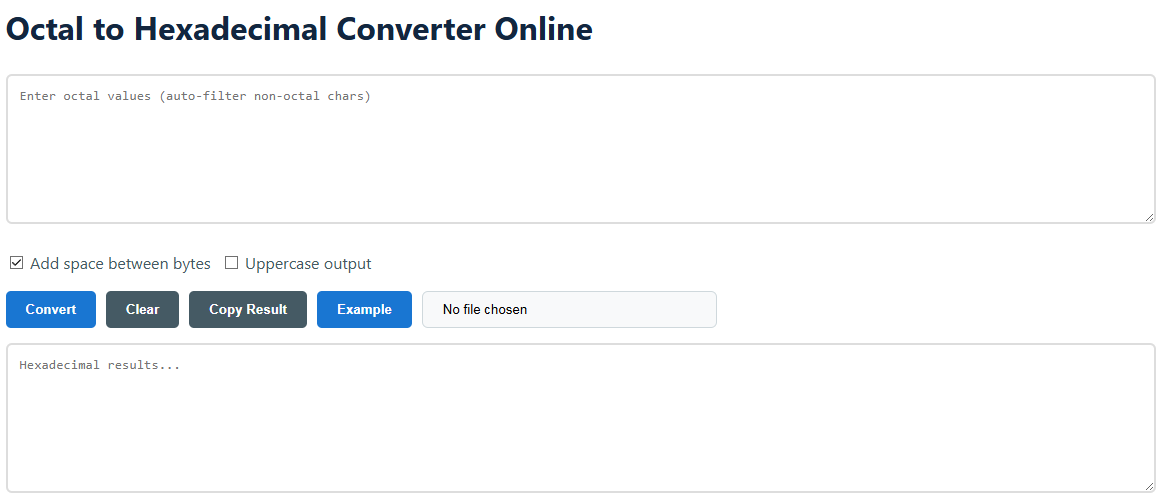
- 輸入你的八進位數字
- 在文字區域「輸入八進位值」中輸入八進位值。八進位數字使用 0-7 的數字。程式不允許八進位數字包含非八進位數字,例如 8、9 或字母,並且會自動忽略它們。
- 也可以透過檔案上傳按鈕上傳含有八進位資料的 .txt 檔案。例如:
152 377 040 or 152377040
- 配置輸出選項
- 在位元組之間加空格: 如果勾選,將在每兩個十六進位數字間加入空格來格式化十六進位輸出(例如,
6B A7 )。這是一種表示位元組值的典型方式。 - 大寫輸出: 如果您希望十六進位數字 A-F 使用大寫,請啟用此選項(例如,
6BA7) 而不是小寫 (6ba7),正如許多程式語言語法所要求的。
- 執行並管理結果
- 點擊 轉換 按鈕以處理您的輸入。十六進位的答案將立即出現在下方的文字區域。
- 按下 複製結果 按鈕將轉換後的值複製到剪貼簿,準備粘貼到您的程式碼或文件中。
- 這 清除 按鈕會重置輸入和輸出欄位,同時 例子 載入一個範例的八進位數值以展示轉換器的運作方式。
八進位和十六進位系統的知識
八進位和十六進位是有位值的數字系統,與我們日常生活中使用的十進位系統相比,在編碼二進位資料時本質上更為緊湊。它們在電腦中的流行是因為它們與二進位(基數為2)有直接的關係。它們是二進位數字的有效簡寫,因為一個八進位數字正好等於三個二進位數字(位元),而一個十六進位數字則等於四位元。這種轉換不僅僅是數學上的學術練習,而是在低階程式設計中、表示記憶體位址、排除數位系統故障,以及處理像 Unix/Linux 這樣的作業系統中的檔案權限時的實際必要性。
1. 核心連結:二進位作為連接器
將進行轉換的最簡單方法是透過二進位。這利用了八進位和十六進位所提供的理想位元分組。要直接從八進位轉換到十六進位,先將八進位轉換成二進位,然後再從二進位轉換成十六進位。此方法具有系統性,能最小化計算錯誤,並可用於人工計算和演算法實作。
- 八進位轉二進位: 每個八進位數字都被替換為其三位二進位等價。例如,八進位
7 是二進位的 111. - 二進位轉十六進位: 將二進位數字從右到左分成每組 4 位。然後將每個 4 位組替換成對應的十六進位數字。
2. 直接轉換十進制
另一種(通常較算術化的方法)是將八進位數字轉換為其十進位等值,然後再將該十進位等值轉換為十六進位。這種方法背後的想法很簡單,但對於較大的數字而言步驟較多。這是通過認識八進位數字中每個數位的位值,將各個數位的貢獻加在一起,然後再通過連續除以16來進行十六進位轉換。
Octal to Decimal: 取每個數字並乘以8n,其中 n 是從右邊開始計數的數字位置,從 0 開始。將結果相加。Decimal to Hexadecimal: 將十進制數值反覆除以16,並將餘數記下。十六進制的值是從餘數序列中反向讀取的(10-15 變成 A-F)。雖然電腦不使用這種方法,但它對於理解數字系統背後的數學原理非常有用。
3. 手動計算範例
讓我們將八進位數字轉換 247 使用二進位橋接方法轉換為十六進位,以展示我們技術自動化的推理。
- 28 = 0102
- 48 = 1002
- 78 = 1112
- 連接:
010100111 - 從右側將二進位分組為 4 位元的小組(如有需要,左側補零):
0000 1010 0111 - 轉換每個組別:
0000 → 0, 1010 → A, 0111 → 7 - 結果:十六進位
0xA7 or A7 (十進位 167)
實用用途與範例
八進位到十六進位的轉換並不是學術上的遺物,而是現代技術中的一個真正工具。它被用於從舊系統維護到尖端開發的各種場合。現在,對這些使用案例的理解使你意識到這個工具的重要性不僅僅在於轉換,而是作為一個有效解決現實技術挑戰的工具。
其他重要的使用案例
- 嵌入式系統與微控制器程式設計: Memory-mapped I/O registers and device control words are commonly documented with addresses and values in hex. For developers working with older documentation or certain hardware guides, these values may be in octal, and they may need to convert them on the fly.
- 數位電路設計與除錯: When you read from a hardware debug port, or evaluate the state of a digital system with a logic analyzer, the data may be in a compact octal format. Switching to hex can help make patterns more understandable and easier to match with software debugger outputs.
- 傳統軟體與組合語言: Some older assembly languages or system documentation ( e.g. , PDP-8 , PDP-11 ) used octal a lot. Modern analysis or cross-development must convert these values to hexadecimal, the current standard.
- 網路與安全分析: Packet headers and some fields in outdated protocols can be expressed in octal. The conversion to hex makes it easier to compare with common protocol analyzers (e.g. Wireshark ), which are primarily hex-based.
- 教育目的: This will be useful for students taking courses in computer architecture , number theory or programming basics since they can immediately check their work on converting by hand and verify their understanding of the relationship between base 8 , base 2 and base 16 .
- 資料恢復與鑑識: In some cases, raw data in forensic analysis of disk sectors or memory dumps might be interpreted in multiple bases. An octal to hex converter is handy for swiftly reinterpreting blocks of data when the initial assumption about the data format changes.
- 顏色代碼轉換(較少見): RGB color is common for hex values; some extremely old or specialized systems may have used octal triplets to express color values. Conversion permits translation to current web-ready hex color codes such as # RRGGBB.
常見問題
- Q: What if I enter 8 or 9?
A: It clears them out automatically. Only the digits 0-7 are usable in octal. Your input will be sanitized in real-time. - Q: I have an extremely long octal number. Can I convert it?
A: Yes. The program can process a vast amount of data, limited only by the capacity and capability of your browser. It is good for transforming long streams of data. - Q: Will the result be different for '0xA7' and 'A7'?
A: Same core hex value. The prefix 0x is a common notation in programming languages (C, Java, Python and others) to indicate a hexadecimal literal. Our tool shows the hex digits; you can add a 0x prefix if your workflow needs it. - Q: When should I check "Add space between bytes"?
A: This is to make raw data dumps easier to understand, like machine code or memory dumps, where data is often inspected one byte at a time (two hex digits per byte). - Q: Does the tool support fractional octal numbers?
A: No, this converter is for integer conversion. Conversion of fractional numbers between bases is a more complicated procedure and is not addressed by this service. - Q: Is my data secure with this online converter?
A: Sure. All conversions are done locally on your web browser (client-side JavaScript). Your information is never transferred to any server, so it remains completely private and safe.
