Using the octal to hexadecimal converter
Convert numbers from the octal number system (base 8) to the hexadecimal system (base 16) quickly, accurately, and for free using this online program. It is intended for programmers, students, and digital electronics engineers and automates a process that is tedious and prone to errors if done manually. Enter your octal number and the converter will immediately give you the correct hexadecimal equivalent, with options to format the result as you wish. It is a user-friendly interface accessible from any device with a web browser, with no need for installation or registration.
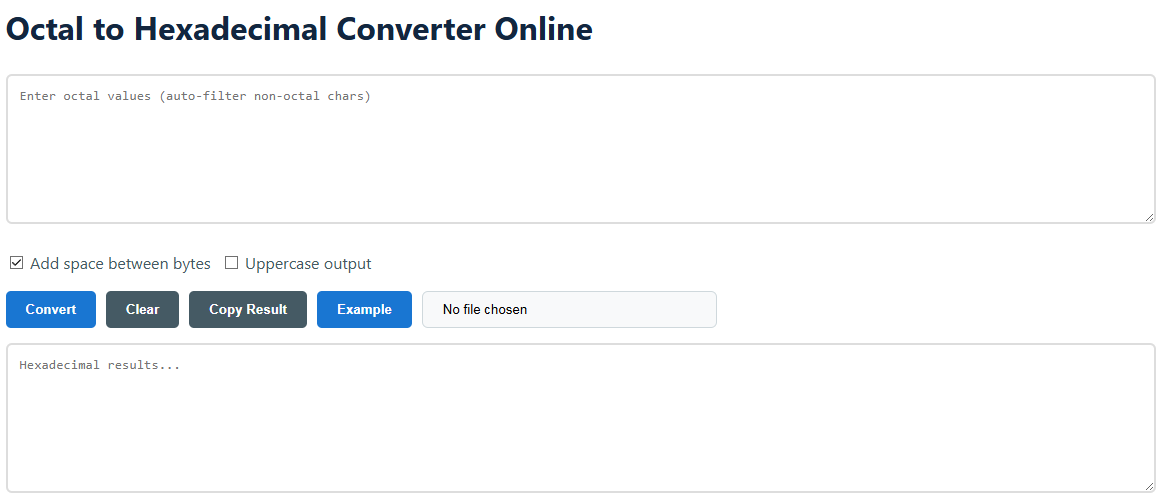
- Enter your octal number
- Enter octal values in the "Enter octal values" text box. Octal numbers use digits from 0 to 7. The program does not allow octal numbers to include non-octal digits such as 8, 9, or letters, and automatically ignores them.
- The download of a .txt file containing octal data can also be carried out via the file upload button. For example:
152 377 040 or 152377040
- Configure output options
- Ajouter un espace entre les octets : If checked, it formats the hex output with a space every two hex digits (for example,
6B A7 ) . C'est une manière typique de représenter les valeurs d'octets. - Sortie en majuscules : Activate this if you want hexadecimal digits A-F to be in uppercase (e.g.,
6BA7) instead of lowercase (6ba7), as required by many programming language syntaxes.
- Execute and manage results
- Click on the Convertir button to process your input. The hexadecimal response will appear immediately in the lower text box.
- Press the Copy the result button to copy the converted value to your clipboard, ready to be pasted into your code or document.
- Le Clair the button resets both the input and output fields, while Exemple load an octal value as an example to show how the converter works.
Knowledge of octal and hexadecimal systems
Octal and hexadecimal digital systems are positional numbering systems and are inherently more compact for encoding binary data than the decimal system that we use in everyday life. Their popularity in computing is due to their direct relationship with binary (base 2). They serve as an efficient shorthand for binary numbers, as one octal digit corresponds exactly to three binary digits (bits) and one hexadecimal digit corresponds to four bits. This conversion is not simply an academic exercise in mathematics, but a practical necessity for low-level programming, memory address representation, troubleshooting digital systems, and managing file permissions in operating systems like Unix/Linux.
1. The Central Link: The Binary as Connector
The simplest way to do the conversion is to go through binary. This takes advantage of the ideal grouping of bits provided by both octal and hexadecimal. To go directly from octal to hexadecimal, convert from octal to binary, then from binary to hexadecimal. The method is systematic and minimizes calculation errors and can be used both for human calculations and for algorithm implementation.
- Octal en binaire : Each octal digit is replaced by its 3-bit binary equivalent. For example, octal
7 is binary 111. - Binaire en hexadécimal : Divide the binary digits into groups of 4 from right to left. Then, replace each group of 4 bits with the corresponding hexadecimal digit.
2. Direct decimal conversion
Another way (often more arithmetic) is to convert the octal number to its decimal equivalent, then convert that decimal equivalent to hexadecimal. The idea behind this method is simple, but it involves more steps for higher numbers. This is done by recognizing the positional value of each digit in the octal number, summing the contributions, and then performing successive divisions by 16 for the hexadecimal conversion.
Octal to Decimal: Take each digit and multiply it by 8n, where n is the position of the digit counting from the right, starting at 0. Add the results.Decimal to Hexadecimal: Divide the decimal value by 16 again, noting the remainders. The hexadecimal value is read in reverse of the sequence of remainders (10-15 become A-F). Although computers do not use this method, it is very useful for helping to understand the mathematical foundations of number systems.
3. Exemple de calcul manuel
Convert the octal number 247 in hexadecimal using the binary-bridge approach to demonstrate the reasoning that our technology automates.
- 28 = 0102
- 48 = 1002
- 78 = 1112
- Concaténer :
010100111 - Group the binary from right to left in 4-bit nibbles (add padding on the left if necessary):
0000 1010 0111 - Convert each group:
0000 → 0, 1010 → A, 0111 → 7 - Result: Hexadecimal
0xA7 or A7 (decimal 167)
Practical uses and examples
Octal to hexadecimal conversion is not an academic relic, but a genuine tool in modern technology. It is used for everything from maintaining legacy systems to cutting-edge development. Now, this understanding of the use cases makes you realize the importance of the tool beyond mere conversion, but as a tool for effectively solving real technical challenges.
Other important use cases
- Embedded systems and microcontroller programming: Memory-mapped I/O registers and device control words are commonly documented with addresses and values in hexadecimal. For developers working with older documentation or certain hardware guides, these values may be in octal, and they may need to convert them on the fly.
- Design and debugging of digital circuits: When you read from a hardware debug port, or evaluate the state of a digital system with a logic analyzer, the data may be in a compact octal format. Switching to hexadecimal can help make patterns more understandable and easier to compare with software debugger outputs.
- Legacy software and assembly : Some older assembly languages or system documentation (for example, PDP-8, PDP-11) used octal extensively. Modern analysis or cross-development must convert these values to hexadecimal, the current standard.
- Network and security analysis: Packet headers and certain fields of obsolete protocols can be expressed in octal. Converting to hexadecimal makes comparison with common protocol analyzers (for example Wireshark), which are mainly based on hexadecimal, easier.
- Mais éducatifThis will be useful for students taking courses in computer architecture, number theory, or basic programming concepts, as they will be able to immediately check their manual conversion work and verify their understanding of the relationship between base 8, base 2, and base 16.
- Data recovery and forensics: In some cases, raw data in forensic analysis of disk sectors or memory dumps can be interpreted in multiple bases. An octal-to-hexadecimal converter is useful for quickly reinterpreting blocks of data when the initial assumption about the data format changes.
- Conversion de code couleur (moins courant) : The RGB color is common for hexadecimal values; some extremely old or specialized systems may have used octal triplets to express color values. Conversion allows translation into modern web-ready hexadecimal color codes such as #RRGGBB.
FAQ
- Q: And what if I enter 8 or 9?
A: It erases them automatically. Only the digits 0 to 7 are usable in octal. Your input will be sanitized in real time. - Q: I have an extremely long octal number. Can I convert it?
A: Yes. The program can handle a huge amount of data, limited only by the capacity and power of your browser. It is good for processing long streams of data. - Q: Will the result be different for '0xA7' and 'A7'?
A: Same base hexadecimal value. The prefix 0x is a common notation in programming languages (C, Java, Python, and others) to indicate a hexadecimal literal. Our tool displays hexadecimal digits; you can add a 0x prefix if your workflow needs it. - Q: When should I check 'Add a space between bytes'?
A: This is to make raw data extractions easier to understand, such as machine code or memory dumps, where data is often inspected one byte at a time (two hexadecimal digits per byte). - Q: Does the tool support fractional octal numbers?
A: No, this converter is intended for the conversion of integers. The conversion of fractional numbers between bases is a more complicated procedure and is not supported by this service. - Q: Are my data secure with this online converter?
A: Of course. All conversions are performed locally on your web browser (client-side JavaScript). Your information is never sent to a server, so it remains completely private and secure.
